World wide web worksheet for Years 3–6: The World Wide Web
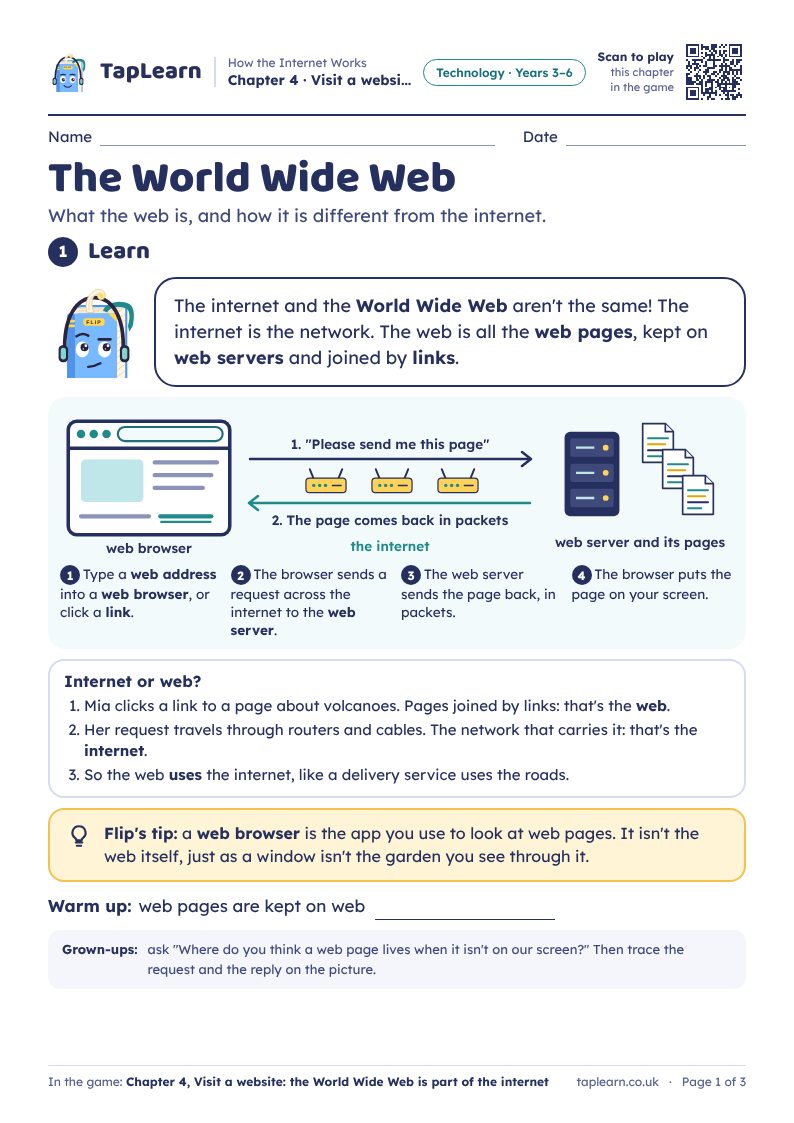
The World Wide Web is a printable world wide web worksheet for Years 3 to 6 (ages 7 to 11) that teaches children that the web is web pages stored on web servers and joined by links, and that it is different from the internet. It follows the KS2 computing curriculum in England: understand computer networks including the internet, and the services they can provide, such as the World Wide Web.
This worksheet is for members
Membership opens every chapter of every game and every worksheet, for all your children.
See the plansAlready a member? Log in to print it.
Start with the free one: Computer networks (chapter 1).
Print it on A4, in colour or black and white. Do it after the chapter, or before it to see what your child already knows.
What's on the worksheet
Explain what the World Wide Web is (web pages on web servers, joined by links) and how it is different from the internet. With a web page detective activity and answers.
- Page 1 · Learn
- A picture of a browser asking a web server for a page across the internet, four steps to load a page, and a worked example: internet or web?
- Page 2 · Try it together
- Web page detective: with a grown-up, find the web address and a link on a web page, click it, and talk about where the page is really kept.
- Page 2–3 · Practise
- Label a browser window, sort statements into internet or web, order how a page reaches the screen, and decide true or false. Then a challenge about the web and the internet.
- Answers sheet
- Every answer, what to watch out for (web and internet the same, pages kept on the device, browser as the web) and a link-hop idea.
3 A4 pages and an answers sheet · about 30 minutes
Using it at home
- Choose the web page yourself for Try it together and stay with your child while they click links.
- Use the roads picture to help: the internet is the roads, and the web is one service travelling on them.
Watch out for
- Thinking the World Wide Web and the internet are the same thing.
- The internet is the network; the web is one service on it. Email and video calls use the internet but aren't the web.
- Thinking web pages are kept on their own device.
- The browser asks a web server for each page every time you visit.
- Mixing up a web browser with the World Wide Web itself.
- The browser is just the app for looking at web pages, like a window you look through.
Questions from the worksheet
- Internet or web? Pages joined together by links.
- Number the steps to show how a web page reaches your screen.
- True or false: web pages are kept on your own tablet.
- Ava says, "The internet and the World Wide Web are just two names for the same thing." Is she right?
The answers are on the answers sheet, for grown-ups.
National curriculum in England
This worksheet practises this statement from the Years 3–6 computing programme of study:
- Understand computer networks including the internet; how they can provide multiple services, such as the world wide web; and the opportunities they offer for communication and collaboration
Source: National curriculum in England: computing programmes of study (DfE)
In the classroom
- Show a web page on the board and have pupils point out the web address and links before the labelling set.
- Use internet or web as a quick sort with mini-whiteboards: I or W.
Questions and answers
What is the difference between the internet and the World Wide Web?
The internet is the worldwide network of networks: the cables, routers and computers. The World Wide Web is the web pages stored on web servers and joined by links, one of many services that use the internet.
Where are web pages stored?
Web pages are stored on computers called web servers. When you visit a page, your browser asks the server for it and the page travels to you in packets.
 TapLearn