Computer networks worksheet for Years 3–6
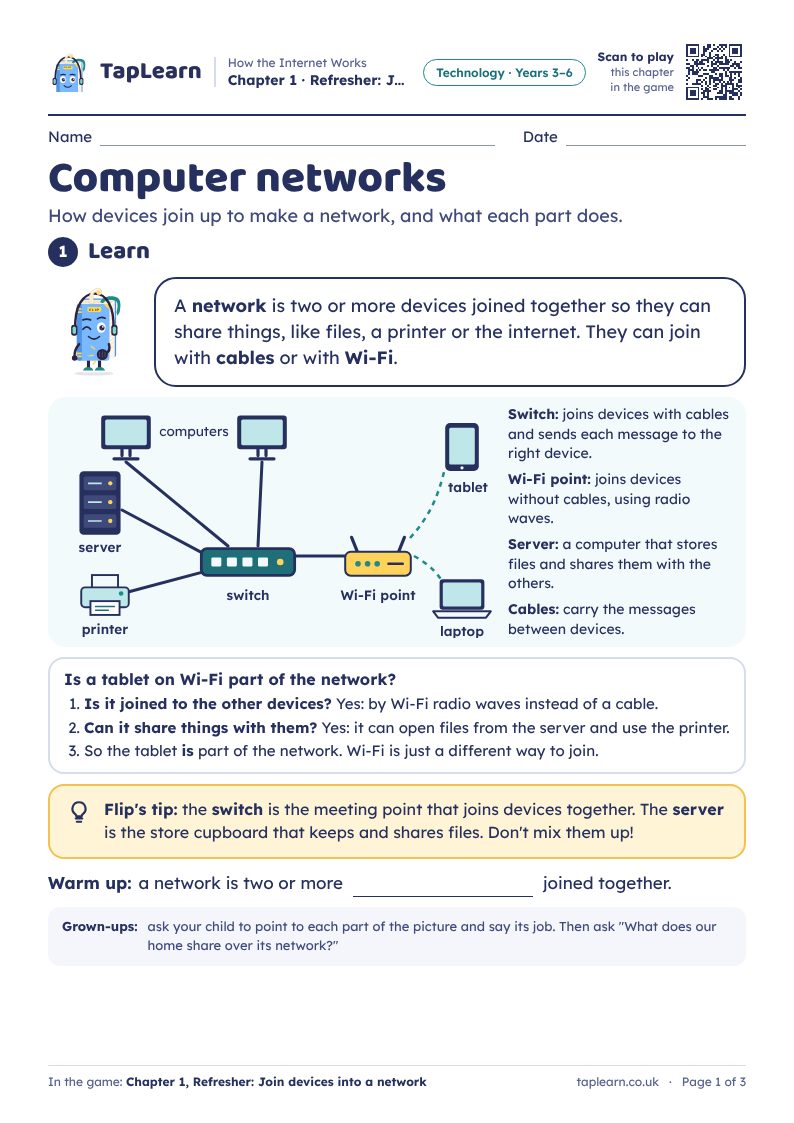
Computer Networks is a printable computer networks worksheet for Years 3 to 6 (ages 7 to 11) that teaches children how devices join up to make a network using switches, Wi-Fi and servers. It follows the KS2 computing curriculum in England: understand computer networks including the internet, and the services they can provide, such as the World Wide Web.
Free to print, no account needed.
Print it on A4, in colour or black and white. Do it after the chapter, or before it to see what your child already knows.
What's on the worksheet
Explain how devices join up to make a network, and what a switch, Wi-Fi and a server each do. With a home network hunt and answers.
- Page 1 · Learn
- A school network picture with a switch, a server, a printer and a Wi-Fi point, and a worked example: is a tablet on Wi-Fi part of the network?
- Page 2 · Try it together
- Our home network: walk round your home, find every device on the network, decide whether it uses Wi-Fi or a cable, and note what it shares.
- Page 2–3 · Practise
- Match the switch, server, Wi-Fi and cable to their jobs, decide true or false, choose switch or server, and explain why schools use networks. Then a challenge about Wi-Fi.
- Answers sheet
- Every answer, what to watch out for (Wi-Fi devices left out, switch and server mixed up) and ideas such as a human network game.
3 A4 pages and an answers sheet · about 30 minutes
Using it at home
- Do the home network hunt together at a quiet moment: it takes about 10 minutes, and most families are surprised by how many devices they find.
- Point out your router: at home it usually does the job of the switch and the Wi-Fi point in one box.
Watch out for
- Thinking devices on Wi-Fi are not part of a network.
- Ask "Can it share things with the other devices?" If yes, it's on the network, wires or not.
- Mixing up a switch and a server.
- A switch joins devices together; a server stores and shares files. "Switch: meeting point. Server: store cupboard."
Questions from the worksheet
- Match each part to its job: switch, server, Wi-Fi, cable.
- True or false: devices that use Wi-Fi are not part of the network.
- Mia saves her story so her teacher can open it on another computer. It is kept on the switch or the server?
- Why do you think a school joins its computers into a network? Give two reasons.
- Leo says, "My tablet uses Wi-Fi, not a cable, so it isn't on the network." Is he right?
The answers are on the answers sheet, for grown-ups.
National curriculum in England
This worksheet practises this statement from the Years 3–6 computing programme of study:
- Understand computer networks including the internet; how they can provide multiple services, such as the world wide web; and the opportunities they offer for communication and collaboration
Source: National curriculum in England: computing programmes of study (DfE)
In the classroom
- Walk the class round the school's own network: spot switches, Wi-Fi points and printers, then do the matching set.
- Play the human network game: one pupil is the switch and passes a ball only to the person it is addressed to.
Questions and answers
What is a computer network?
A computer network is two or more devices joined together so they can share things such as files, printers and the internet. Devices can join with cables or with Wi-Fi.
What is the difference between a switch and a server?
A switch joins devices on a network and sends each message to the right one. A server is a computer that stores files and shares them with the other devices.
More worksheets from How the Internet Works: A Packet Adventure with Pip
- Chapter 2: What is the internet worksheet: What is the internet? Members
- Chapter 3: Data packets worksheet Members
- Chapter 4: World wide web worksheet: The World Wide Web Members
- Chapter 5: Internet services worksheet Members
- Chapter 6: Online collaboration worksheet: Working together online Members
 TapLearn