How the Internet Works: A Packet Adventure with Pip
Learn how the internet works, from networks and routers to packets and the web, by building networks and sending messages around the world.
Online game, chapter 1 free · Years 3 to 6 (KS2) · ages 8–11 · national curriculum in England · no adverts · plays on a phone, tablet or computer · no sign-up to start.
An online technology game for Years 3 to 6 (KS2). It covers the national curriculum in England, Years 3–6 computing: “Understand computer networks including the internet; how they can provide multiple services, such as the world wide web; and the opportunities they offer for communication and collaboration”.
6 short chapters, about 45 minutes in all. Children can stop after any chapter.
Start playing for free. Plays in the browser on phones, tablets and computers: no app, no adverts.
Free for teachers: every chapter on the whiteboard with a free teacher account.
Last updated · Checked against the national curriculum in England by the TapLearn team
What you'll learn
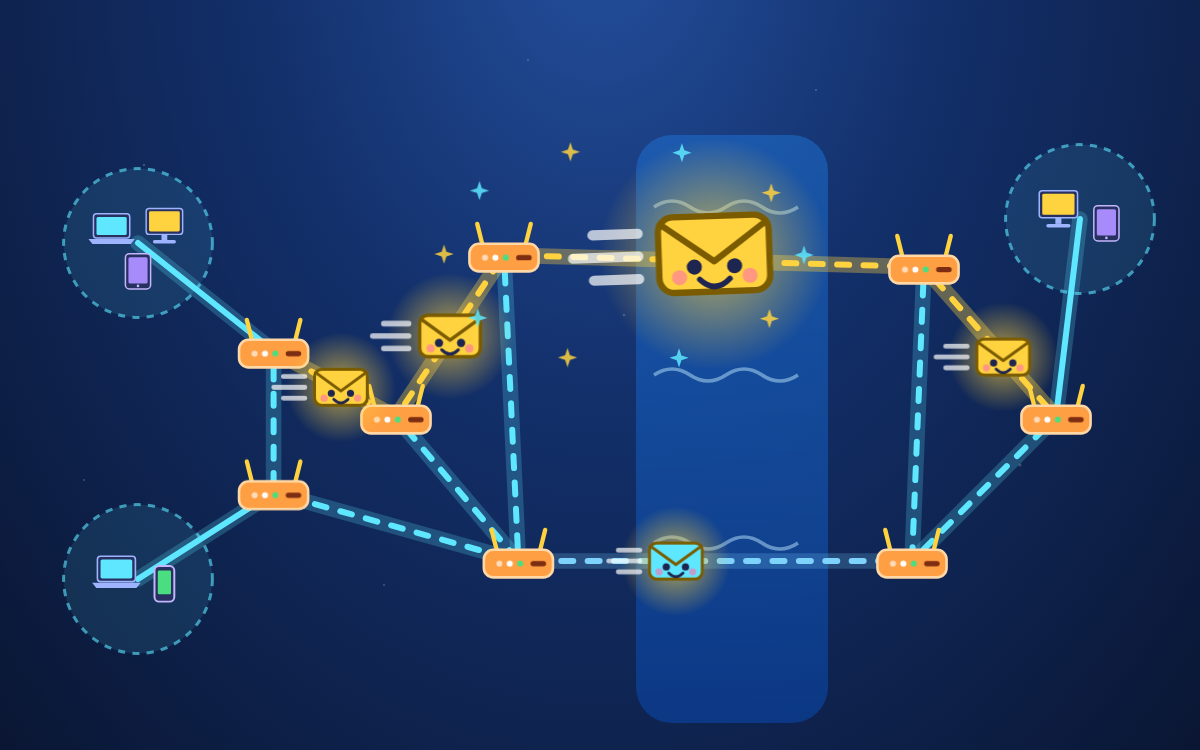
How switches, Wi-Fi and servers join devices into a network
Why the internet is called a network of networks
How routers and undersea cables carry messages between continents
How data travels in numbered packets with an IP address
Why the World Wide Web is one service on the internet
How shared files on servers let people work together
Chapter by chapter
Refresher: Join devices into a networkStart playing for free
Years 3–6 computing · 1
Link networks with routers to make the internet
Years 3–6 computing · 1
Send messages across the internet in packets
Years 3–6 computing · 1
Visit a website: the World Wide Web is part of the internet
Years 3–6 computing · 1
Discover the internet's many services: web, email, video calls, games
Years 3–6 computing · 1
Communicate and work together online
Years 3–6 computing · 1
Internet Master Challenge (10 questions) (10 questions)
What the chapters cover in the national curriculum in England:
Years 3–6 computing: Understand computer networks including the internet; how they can provide multiple services, such as the world wide web; and the opportunities they offer for communication and collaboration
About this adventure
How the Internet Works is an interactive game that teaches children aged 8–11 how computer networks join up to make the internet, how data travels in packets, and how the World Wide Web is different from the internet.
Guided by Pip, a friendly data packet, players connect devices to a switch, add a wireless access point and a server, then link networks with routers. They steer a message through an undersea cable to New York, cut a photo into numbered packets for Gran in Sydney, and visit a website stored on a web server.
Along the way they sort online activities into the web and other internet services such as email and video calls, help three friends in different cities make one shared poster, and find out that 'the cloud' is really servers in data centres. Short quick-check questions after each activity show what has stuck.
Questions and answers
How does the internet work, in simple words?
The internet is millions of computer networks joined together by routers and cables. When you send a message, it is split into small packets that each carry an address, travel along the cables, and are put back together in order at the other end.
What is the difference between the internet and the World Wide Web?
The internet is the network itself: the cables, routers and computers that connect the world. The World Wide Web is one service that runs on it, made of web pages stored on web servers and joined by links. Email and video calls use the internet too, but they are not the web.
What does a router do?
A router passes messages between different networks and sends each one along the right path. The router in your home joins your home network to the rest of the internet, and many more routers pass your message along until it arrives.
What age is this internet game for?
It is designed for children aged 8 to 11 and follows the KS2 computing curriculum in England, pitched mainly at Year 5. A short refresher at the start covers networks from Year 3, and it can be skipped by children who already know it.
What does the game include and how long does it take?
The game has six chapters with spoken narration, hands-on activities and quick-check questions, followed by a 10-question challenge. Playing everything takes about 45 minutes, and children can start any chapter from the map and return later.
We count visits to make TapLearn better.We use one cookie, only on this site, to see how families find and use it. No adverts, and nothing is shared.One cookie, only on this site. No adverts.How we measure

 TapLearn