Data packets worksheet for Years 3–6
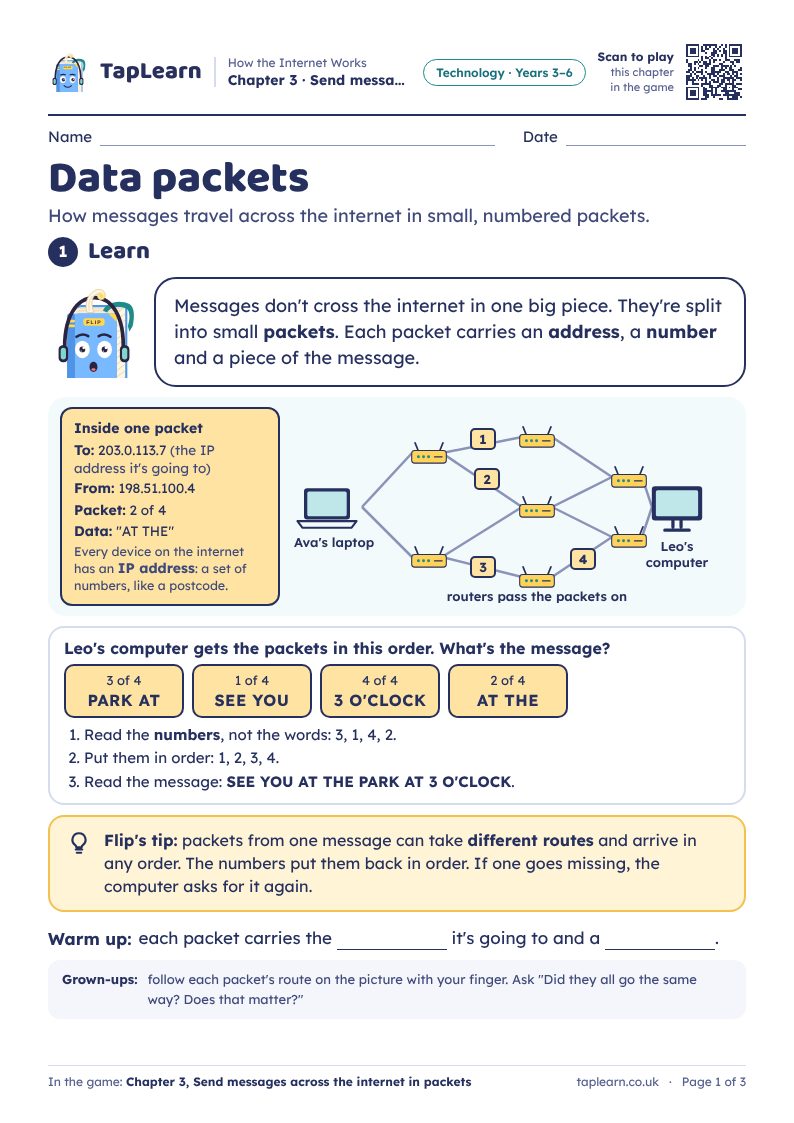
Data Packets is a printable data packets worksheet for Years 3 to 6 (ages 7 to 11) that teaches children how messages travel across the internet in small packets that carry an IP address and a number. It follows the KS2 computing curriculum in England: understand computer networks including the internet, and the services they can provide, such as the World Wide Web.
This worksheet is for members
Membership opens every chapter of every game and every worksheet, for all your children.
See the plansAlready a member? Log in to print it.
Start with the free one: Computer networks (chapter 1).
Print it on A4, in colour or black and white. Do it after the chapter, or before it to see what your child already knows.
What's on the worksheet
Explain how messages cross the internet in small packets that carry an address and a number and are put back in order. With a sticky-note packets game and answers.
- Page 1 · Learn
- What is inside one packet, a picture of packets taking different routes through routers, and a worked example putting four packets back in order.
- Page 2 · Try it together
- Sticky-note packets: write a message across four numbered notes addressed to your child, shuffle and deliver them, then rebuild the message.
- Page 2–3 · Practise
- Rebuild a message from shuffled packets, decide true or false, tick what a packet carries, and split a message into three packets. Then a challenge about routes.
- Answers sheet
- Every answer, what to watch out for (one big piece, same route, no address) and a jigsaw post idea.
3 A4 pages and an answers sheet · about 30 minutes
Using it at home
- Play the sticky-note game first: it takes about 10 minutes and makes the Practise sets much easier.
- Try hiding one note during the game and ask what the receiving computer should do (ask for it again).
Watch out for
- Thinking a file travels across the internet in one big piece.
- Even one photo is split into many packets, each with its own address and number.
- Thinking every packet of a message must take the same route.
- Routers send each packet the best way they can at that moment; the numbers sort it out at the end.
- Forgetting that each packet carries the address it is going to.
- Ask "How would a router know where to send it?"
Questions from the worksheet
- These packets arrived in this order: 2, 4, 1, 3. Write the message.
- True or false: packets from one message can take different routes.
- What does a packet carry? Tick the three right answers.
- Why does every packet need to carry an address?
- Sam says, "All the packets must take the same route, or the message will get muddled up." Is he right?
The answers are on the answers sheet, for grown-ups.
National curriculum in England
This worksheet practises this statement from the Years 3–6 computing programme of study:
- Understand computer networks including the internet; how they can provide multiple services, such as the world wide web; and the opportunities they offer for communication and collaboration
Source: National curriculum in England: computing programmes of study (DfE)
In the classroom
- Run the sticky-note game in groups, with pupils as routers passing packets by different routes round the classroom.
- Use the shuffled-packet set as a quick starter on mini-whiteboards.
Questions and answers
What is a data packet?
A data packet is a small piece of a message sent across the internet. Each packet carries the address it is going to, a number showing its place in the message, and part of the data.
Why is data sent in packets?
Small packets can travel by whichever route is free and be put back in order at the end. If one goes missing, only that packet needs sending again, not the whole message.
More worksheets from How the Internet Works: A Packet Adventure with Pip
- Chapter 1: Computer networks worksheet Free
- Chapter 2: What is the internet worksheet: What is the internet? Members
- Chapter 4: World wide web worksheet: The World Wide Web Members
- Chapter 5: Internet services worksheet Members
- Chapter 6: Online collaboration worksheet: Working together online Members
 TapLearn