Computer storage worksheet for Years 4–6: Saving and storage
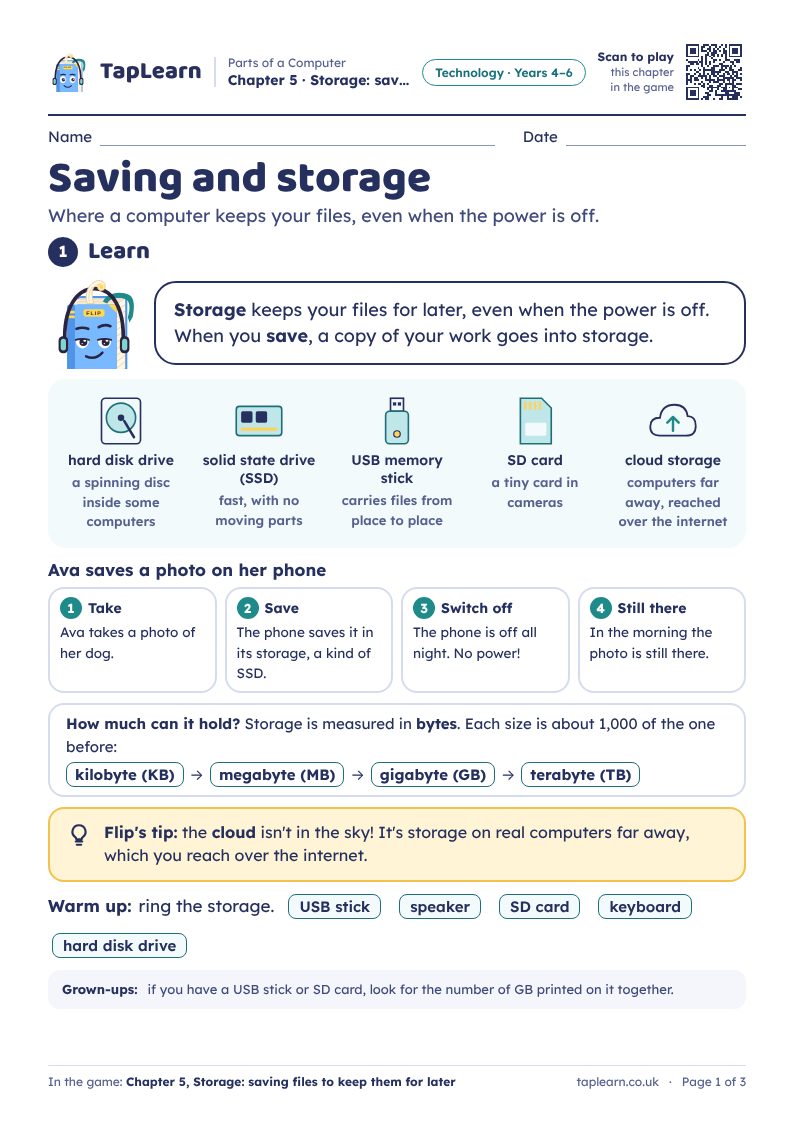
Saving and Storage is a printable computer storage worksheet for Years 4 to 6 (ages 8 to 11) that teaches children how storage keeps saved files when the power is off, and the main kinds of storage from hard disk drives to the cloud. It links to the national curriculum in England for KS2 computing: select, use and combine a variety of software on a range of digital devices to accomplish given goals.
This worksheet is for members
Membership opens every chapter of every game and every worksheet, for all your children.
See the plansAlready a member? Log in to print it.
Start with the free one: Input devices (chapter 1).
Print it on A4, in colour or black and white. Do it after the chapter, or before it to see what your child already knows.
What's on the worksheet
Learn how storage keeps saved files when the power is off, the main kinds of storage from hard drives and SSDs to the cloud, and how storage is measured. With a storage hunt at home and answers.
- Page 1 · Learn
- Five kinds of storage, Ava's photo saved on a phone and still there after a night switched off, and the sizes from kilobytes to terabytes. A warm-up asks children to ring the storage.
- Page 2 · Try it together
- Storage detectives: find three devices at home that keep files, talk about what they keep and check how much storage each has. Then match kinds of storage to what they are.
- Page 3 · Practise
- Put KB, MB, GB and TB in order, choose storage for three jobs, explain why backups matter, and a challenge about switching off a laptop.
- Answers sheet
- Every answer by page, with notes on thinking switching off deletes files and that the cloud is in the sky.
3 A4 pages and an answers sheet · about 25 minutes
Using it at home
- For Storage detectives, help your child look in a phone or tablet's settings to see how much storage it has and what fills it; it takes about 10 minutes.
- Show your child a photo taken days ago and ask how it survived the phone being switched off or charged overnight.
Watch out for
- Thinking saved files are lost when the computer is switched off.
- Saved files are kept in storage, which doesn't need power. Show a photo from last week that's still on the phone.
- Thinking memory (RAM) keeps files after the computer is switched off.
- RAM forgets without power; storage is what keeps files. Use the desk (memory) and cupboard (storage) idea.
Questions from the worksheet
- Put the sizes in order, from smallest to largest: GB, KB, TB, MB.
- Which storage would you choose? Leo wants Gran, who lives in another town, to see his holiday photos.
- Why is it a good idea to keep a second copy (a backup) of important files in a different place?
- Ava says, "When I switch off my laptop, all my saved files get deleted." Is she right? Explain.
The answers are on the answers sheet, for grown-ups.
National curriculum in England
This worksheet practises this statement from the Years 3–6 computing programme of study:
- Select, use and combine a variety of software (including internet services) on a range of digital devices to design and create a range of programs, systems and content that accomplish given goals, including collecting, analysing, evaluating and presenting data and information
Source: National curriculum in England: computing programmes of study (DfE)
In the classroom
- Pass round real storage such as a USB stick and an SD card and read the sizes printed on them.
- Use Practise C as a pair discussion: there can be more than one good answer if the reason is right.
Questions and answers
What is computer storage?
Storage is the part of a computer that keeps files, such as photos, documents and games, even when the power is off. Hard disk drives, SSDs, USB sticks, SD cards and cloud storage are all kinds of storage.
What is cloud storage?
Cloud storage keeps your files on real computers in buildings far away, which you reach over the internet. It lets you see your files on different devices and keeps a backup if one device breaks.
 TapLearn