Output devices worksheet for Years 4–6
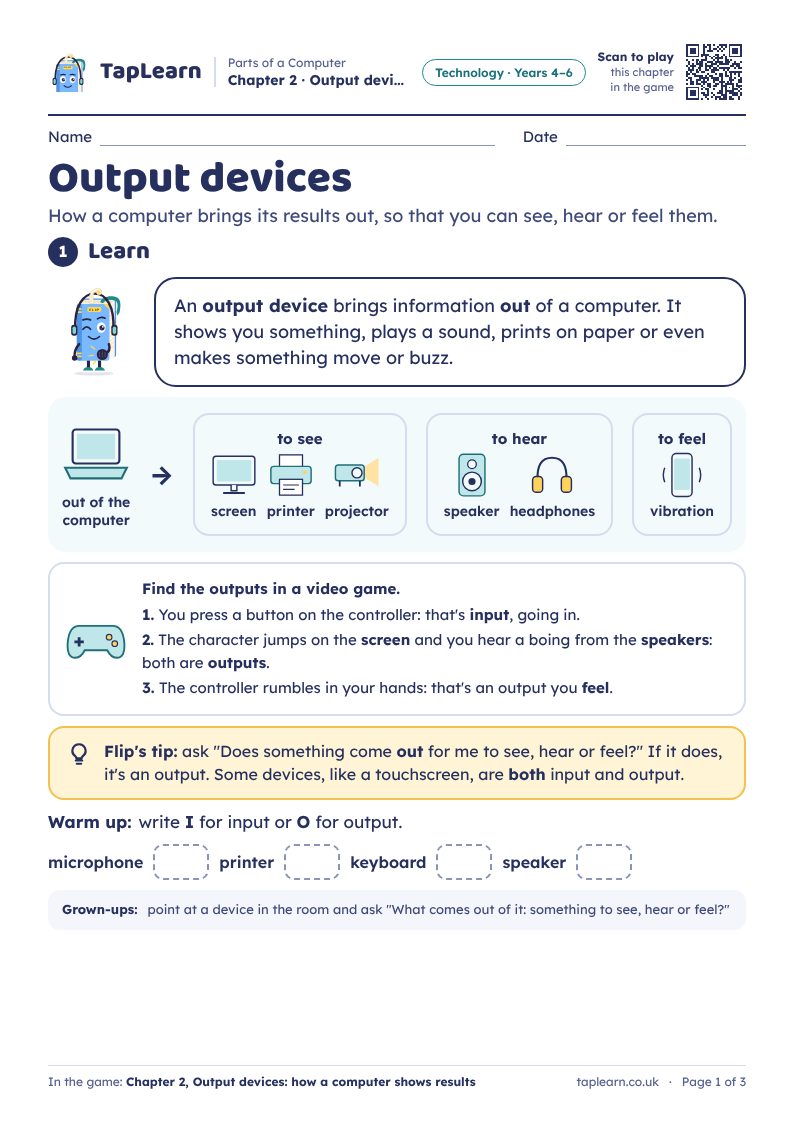
Output Devices is a printable output devices worksheet for Years 4 to 6 (ages 8 to 11) that teaches children to spot devices such as screens, speakers and printers that bring results out of a computer, and to sort input from output. It links to the national curriculum in England for KS2 computing: select, use and combine a variety of software on a range of digital devices to accomplish given goals.
This worksheet is for members
Membership opens every chapter of every game and every worksheet, for all your children.
See the plansAlready a member? Log in to print it.
Start with the free one: Input devices (chapter 1).
Print it on A4, in colour or black and white. Do it after the chapter, or before it to see what your child already knows.
What's on the worksheet
Spot output devices such as screens, speakers and printers that bring results out of a computer, and sort devices into input, output or both. With an output-spotting activity at home and answers.
- Page 1 · Learn
- Outputs to see, hear and feel, then a worked example finding the inputs and outputs in a video game. A warm-up labels four devices I or O.
- Page 2 · Try it together
- Output spotters: use a phone, TV or microwave in a normal way and record what you can see, hear and feel coming out. Then sort eight devices into input, output or both.
- Page 3 · Practise
- Choose the output device for four jobs, invent and draw a gadget with one input and one output, explain why a touchscreen is both, and a challenge about printers.
- Answers sheet
- Every answer by page, with notes on input and output mix-ups and on devices that do both.
3 A4 pages and an answers sheet · about 25 minutes
Using it at home
- Do Output spotters with devices you're already using: changing the TV channel or setting an alarm is enough, and it takes about 10 minutes.
- Let your child invent their own gadget in Practise C: any idea is fine, as long as it has an input and an output.
Watch out for
- Mixing up input and output devices, for example calling a microphone an output.
- Ask "Is information going into the computer, or coming out to me?" A microphone sends sound in; a speaker brings it out.
- Thinking a touchscreen can only be input or only output.
- It does both: you touch it to give information (input) and it shows you pictures (output).
- Thinking a printer is an input because paper goes in.
- Paper isn't information. The information comes out of the computer onto the paper, so a printer is an output.
Questions from the worksheet
- Sort the devices into input only, output only or both: keyboard, speaker, printer, microphone, touchscreen, screen, mouse, headphones.
- Which output device is needed? Leo wants to listen to music without disturbing his sister.
- Why is a touchscreen both an input and an output device?
- Leo says, "A printer is an input device, because I put paper into it." Is he right? Explain.
The answers are on the answers sheet, for grown-ups.
National curriculum in England
This worksheet practises this statement from the Years 3–6 computing programme of study:
- Select, use and combine a variety of software (including internet services) on a range of digital devices to design and create a range of programs, systems and content that accomplish given goals, including collecting, analysing, evaluating and presenting data and information
Source: National curriculum in England: computing programmes of study (DfE)
In the classroom
- Use the invent-a-gadget task in pairs, then share designs and let the class spot each input and output.
- Run Output spotters in class with a tablet, a projector and a speaker.
Questions and answers
What is an output device?
An output device brings information out of a computer so that people can see, hear or feel it. Screens, speakers, headphones, printers and projectors are output devices.
Can a device be both input and output?
Yes. A touchscreen senses your finger (input) and shows pictures (output), and a headset with a microphone both listens and plays sound.
 TapLearn