Computer memory (RAM) worksheet for Years 4–6: Memory (RAM)
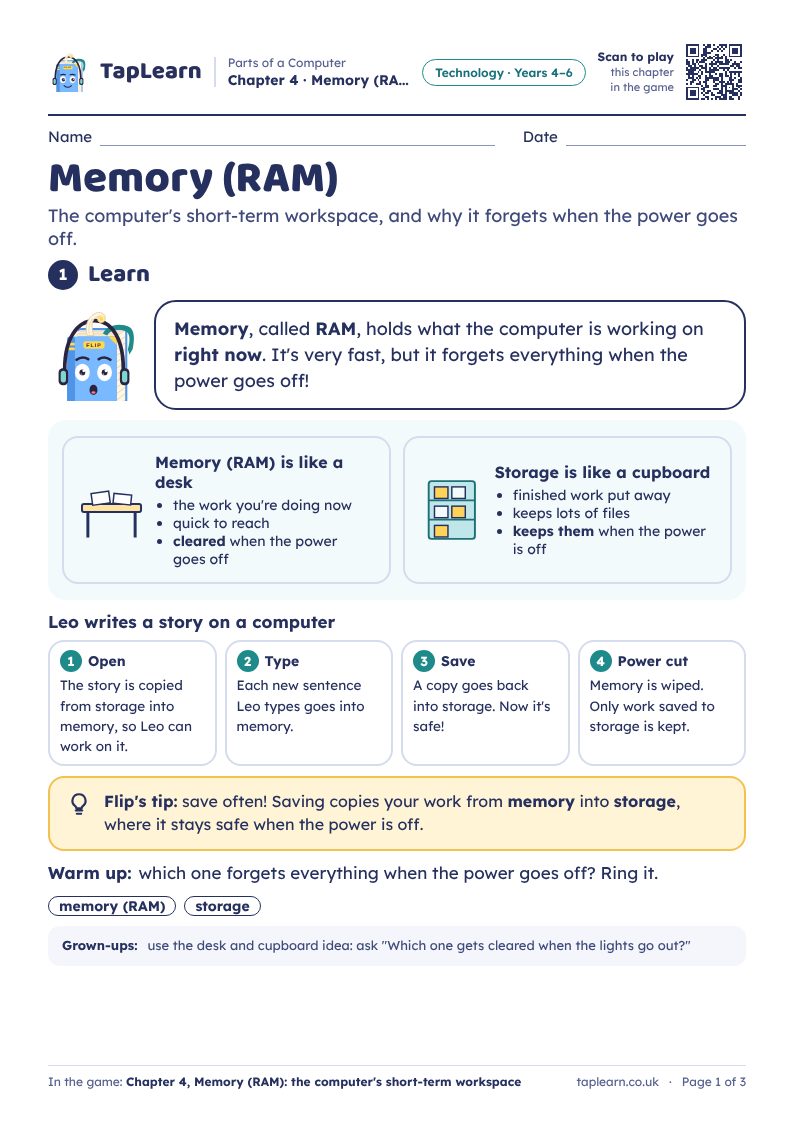
Memory (RAM) is a printable computer memory worksheet for Years 4 to 6 (ages 8 to 11) that teaches children that RAM holds what a computer is working on now and forgets it without power, while storage keeps saved files. It links to the national curriculum in England for KS2 computing: select, use and combine a variety of software on a range of digital devices to accomplish given goals.
This worksheet is for members
Membership opens every chapter of every game and every worksheet, for all your children.
See the plansAlready a member? Log in to print it.
Start with the free one: Input devices (chapter 1).
Print it on A4, in colour or black and white. Do it after the chapter, or before it to see what your child already knows.
What's on the worksheet
Learn that memory (RAM) holds what a computer is working on now and forgets it when the power goes off, while storage keeps saved files. With a desk and cupboard game and answers.
- Page 1 · Learn
- Memory is compared to a desk and storage to a cupboard, then Leo's story is followed through opening, typing, saving and a power cut. A warm-up asks which one forgets.
- Page 2 · Try it together
- Desk and cupboard: write words on scraps of paper, save copies in a box, then a grown-up calls power cut and the desk is cleared. Record what was kept and lost, then sort statements M or S.
- Page 3 · Practise
- Say what happens to saved and unsaved work, fill the gaps, explain why more RAM helps using the desk idea, and a challenge about not saving.
- Answers sheet
- Every answer by page, with notes on thinking memory keeps files and that switching off deletes saved files.
3 A4 pages and an answers sheet · about 25 minutes
Using it at home
- The desk and cupboard game takes about 10 minutes at the kitchen table: let your child be the computer and you call the power cuts.
- When your child uses a computer or tablet, ask "Have you saved it?" and talk about where the work goes.
Watch out for
- Thinking memory (RAM) keeps files after the computer is switched off.
- In everyday talk memory lasts, but in a computer RAM is short-term. It forgets without power; storage keeps files.
- Thinking saved files are lost when the computer is switched off.
- Saved files stay in storage. Only unsaved work, still in RAM, is lost.
- Mixing up memory, for work happening now, with storage, for keeping files.
- Use the picture: memory is the desk you work on now; storage is the cupboard where finished work is put away.
Questions from the worksheet
- Sam types a long email. Before he saves it, the power goes off. What will he find when it comes back on?
- Fill the gaps: Another name for memory is ___. It forgets everything when the ___ goes off.
- A computer with more RAM can have more programs open at once. Use the desk idea to explain why.
- Sam says, "I don't need to save. The computer's memory will remember my work after I switch it off." Is he right? Explain.
The answers are on the answers sheet, for grown-ups.
National curriculum in England
This worksheet practises this statement from the Years 3–6 computing programme of study:
- Select, use and combine a variety of software (including internet services) on a range of digital devices to design and create a range of programs, systems and content that accomplish given goals, including collecting, analysing, evaluating and presenting data and information
Source: National curriculum in England: computing programmes of study (DfE)
In the classroom
- Act out the desk and cupboard game with the whole class, using a table and a box at the front.
- Use the M or S sort as a quick check at the end of the lesson.
Questions and answers
What is RAM in a computer?
RAM is the computer's memory: a fast, short-term workspace that holds the programs and files being used right now. It forgets everything when the power goes off.
What is the difference between memory and storage?
Memory (RAM) holds what the computer is working on now and is cleared when the power goes off. Storage keeps saved files for later, even when the computer is switched off.
 TapLearn