Input devices worksheet for Years 4–6
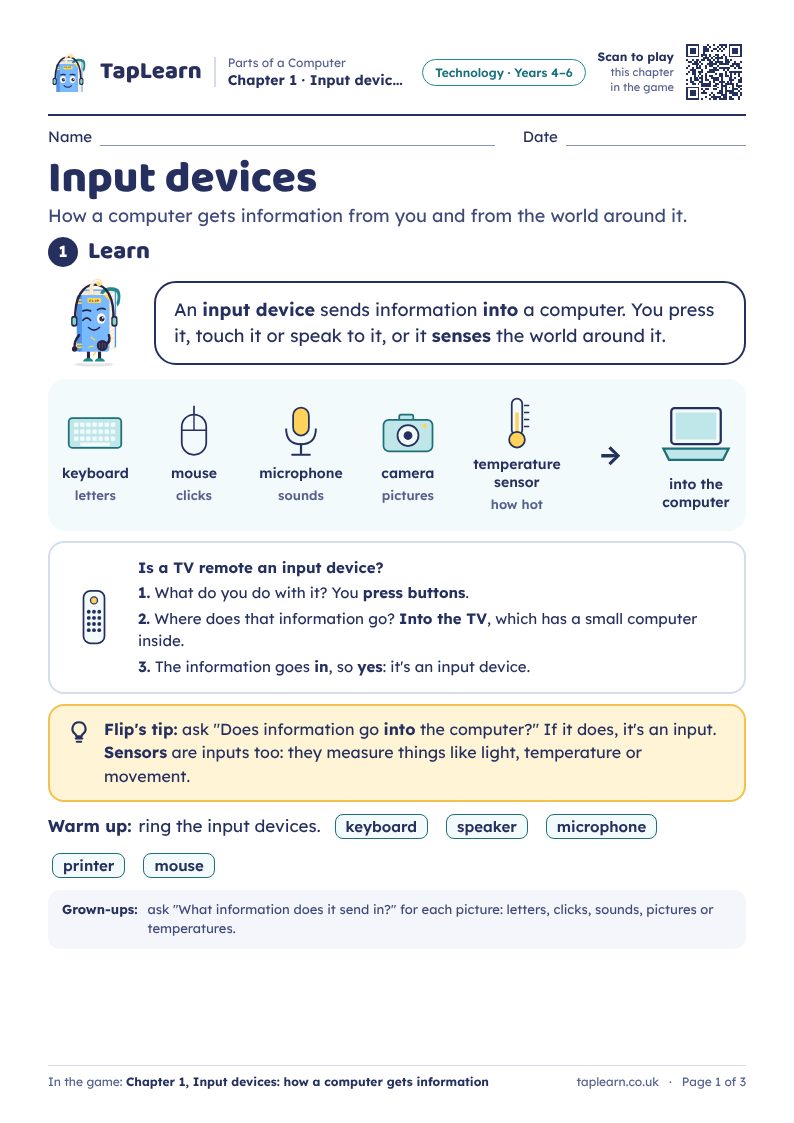
Input Devices is a printable input devices worksheet for Years 4 to 6 (ages 8 to 11) that teaches children to spot devices such as keyboards, microphones, cameras and sensors that send information into a computer. It links to the national curriculum in England for KS2 computing: select, use and combine a variety of software on a range of digital devices to accomplish given goals.
Free to print, no account needed.
Print it on A4, in colour or black and white. Do it after the chapter, or before it to see what your child already knows.
What's on the worksheet
Spot input devices such as keyboards, microphones, cameras and sensors that send information into a computer, and choose the right one for a job. With an input hunt around the home and answers.
- Page 1 · Learn
- Five input devices and the information each sends in, then a worked example: is a TV remote an input device? A warm-up asks children to ring the inputs.
- Page 2 · Try it together
- Input hunt: walk round the home finding things you press, touch, speak to or that sense you, and record what information each sends in. Then match devices to their information.
- Page 3 · Practise
- Ring every device that can be used for input, choose the input device for four jobs, explain how a touchscreen is an input, and a challenge about speakers.
- Answers sheet
- Every answer by page, with notes on mixing up input and output and on devices like touchscreens that do both.
3 A4 pages and an answers sheet · about 25 minutes
Using it at home
- The input hunt takes about 10 minutes and needs nothing but your home: a TV remote, microwave buttons and a phone screen are all good finds.
- For each device, ask "Which way is the information going?" and let your child decide before you say anything.
Watch out for
- Mixing up input and output devices, for example calling a speaker an input.
- Ask "Is information going into the computer, or coming out to me?" Sound comes out of a speaker, so it's an output; a microphone sends sound in.
- Thinking a device like a touchscreen can only be input or only output.
- A touchscreen is both: it senses your finger (input) and shows pictures and words (output).
Questions from the worksheet
- Ring every device that can be used for input: keyboard, speaker, touchscreen, microphone, printer, light sensor, mouse, headphones.
- Which input device is needed? Ava wants to record herself singing.
- How is a phone's touchscreen an input device? What other job does it do?
- Sam says, "A speaker is an input device, because sound goes into it from the computer." Is he right? Explain.
The answers are on the answers sheet, for grown-ups.
National curriculum in England
This worksheet practises this statement from the Years 3–6 computing programme of study:
- Select, use and combine a variety of software (including internet services) on a range of digital devices to design and create a range of programs, systems and content that accomplish given goals, including collecting, analysing, evaluating and presenting data and information
Source: National curriculum in England: computing programmes of study (DfE)
In the classroom
- Use the eight device cards from Practise B as a quick sort on mini-whiteboards: input or not input?
- Sam's speaker challenge works well as a talk-partner question before the class looks at output devices.
Questions and answers
What is an input device?
An input device sends information into a computer. Keyboards, mice, microphones, cameras, touchscreens and sensors are all input devices.
Is a sensor an input device?
Yes. A sensor measures something, such as temperature, light or movement, and sends that information into a computer, so it is an input device.
More worksheets from Parts of a Computer: Look Inside with Byte the Robot
- Chapter 2: Output devices worksheet Members
- Chapter 3: Input, process, output worksheet Members
- Chapter 4: Computer memory (RAM) worksheet: Memory (RAM) Members
- Chapter 5: Computer storage worksheet: Saving and storage Members
- Chapter 6: Planning a data project worksheet: Plan a data project Members
 TapLearn