Kitchen appliances worksheet for Reception–Year 3: Smoothie maker
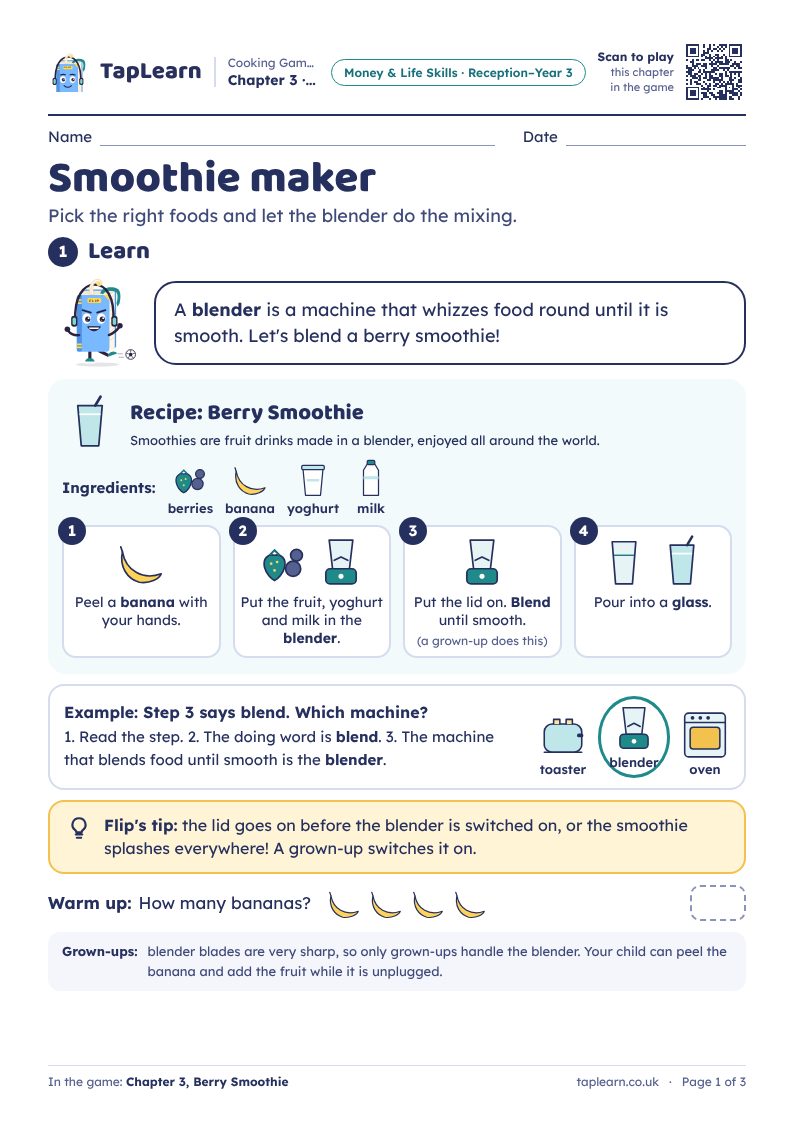
Smoothie maker is a printable kitchen appliances worksheet for Reception to Year 3 (ages 4 to 8) that helps children choose the ingredients for a berry smoothie and learn what a blender does. Children follow a four-step picture recipe, try a hands-on kitchen activity with a grown-up, and practise by ringing, matching, ordering and drawing.
Free to print, no account needed.
Print it on A4, in colour or black and white. Do it after the chapter, or before it to see what your child already knows.
What's on the worksheet
Children choose the four foods in a berry smoothie, put the steps in order, pick the glass and learn that a blender blends food until smooth. Includes a squish-in-a-bag smoothie activity and an answers sheet.
- Page 1 · Learn
- A picture recipe shows the smoothie steps, a worked example picks the blender for 'blend', and Flip reminds children that the lid goes on before a grown-up switches it on.
- Page 2 · Try it together
- Squish smoothie: Peel the banana. Put it in the bag with the berries and yoghurt. A grown-up opens the bag and spoons it into a cup. Taste it!
- Page 2–3 · Practise
- Five short sets: ring the ingredients, ring the right container, put the steps in order, ring the machine, draw. Then a Challenge and an I can list.
- Answers sheet
- Every answer by page, what to watch out for (adding a different food from the one the recipe asks for; putting food in a different bowl or pan from the one the recipe asks for), and quick ideas to try without paper.
3 A4 pages and an answers sheet · about 25 minutes
In the classroom
- Use the 'Ring the four foods' question as a quick show-me task with picture cards on the board.
Questions from the worksheet
- Ring the four foods in the smoothie.
- Where do you pour the smoothie at the end? Ring it.
- Ring the machine that turns the fruit into a smooth drink.
- Sam puts the fruit in the blender. He wants to switch it on with no lid. What should happen first?
The answers are on the answers sheet, for grown-ups.
Using it at home
- Make the squish smoothie at snack time: your child does the squishing, and you open the bag and pour it.
- Talk about blender safety as you go: the blades are sharp, so only grown-ups handle the blender.
Watch out for
- Adding a different food from the one the recipe asks for.
- Point to each food on the recipe card, then find the same picture before you start.
- Putting food in a different bowl or pan from the one the recipe asks for.
- Read the step again and listen for the container word: "in a bowl" or "in a pan"?
- Choosing a different machine from the one the recipe needs.
- Ask: "Do we need to cook, bake, toast or blend?" Each machine has its own job.
Questions and answers
What does a blender do?
A blender is a kitchen machine with sharp, spinning blades that mix and chop food until it is smooth. A grown-up puts the lid on and switches it on.
Can young children help make a smoothie?
Yes: children can peel bananas, add fruit and pour. The grown-up handles the blender because the blades are sharp.
More worksheets from Cooking Game for Kids: Make Recipes from Around the World
- Chapter 1: Kitchen utensils worksheet: Pancake helper Free
- Chapter 2: How heat changes food worksheet: Omelette helper Free
- Chapter 4: Cooking tools worksheet: Pasta chef Free
- Chapter 5: No-cook recipe worksheet: Mash it up Free
- Chapter 6: Raw and cooked food worksheet: Fried rice helper Free
- Chapter 7: Sequencing recipe steps worksheet: Curry cook Free
- Chapter 8: Following a picture recipe worksheet: Toast and jam Free
- Chapter 9: Pizza recipe worksheet: Pizza maker Free
- Chapter 10: Salad recipe worksheet: Salad bowl Free
- Chapter 11: Blending food worksheet: Hummus maker Free
- Chapter 12: Mashed potatoes worksheet: Mash it smooth Free
- Chapter 13: Rice balls worksheet: Rice ball maker Free
 TapLearn