What you'll learn
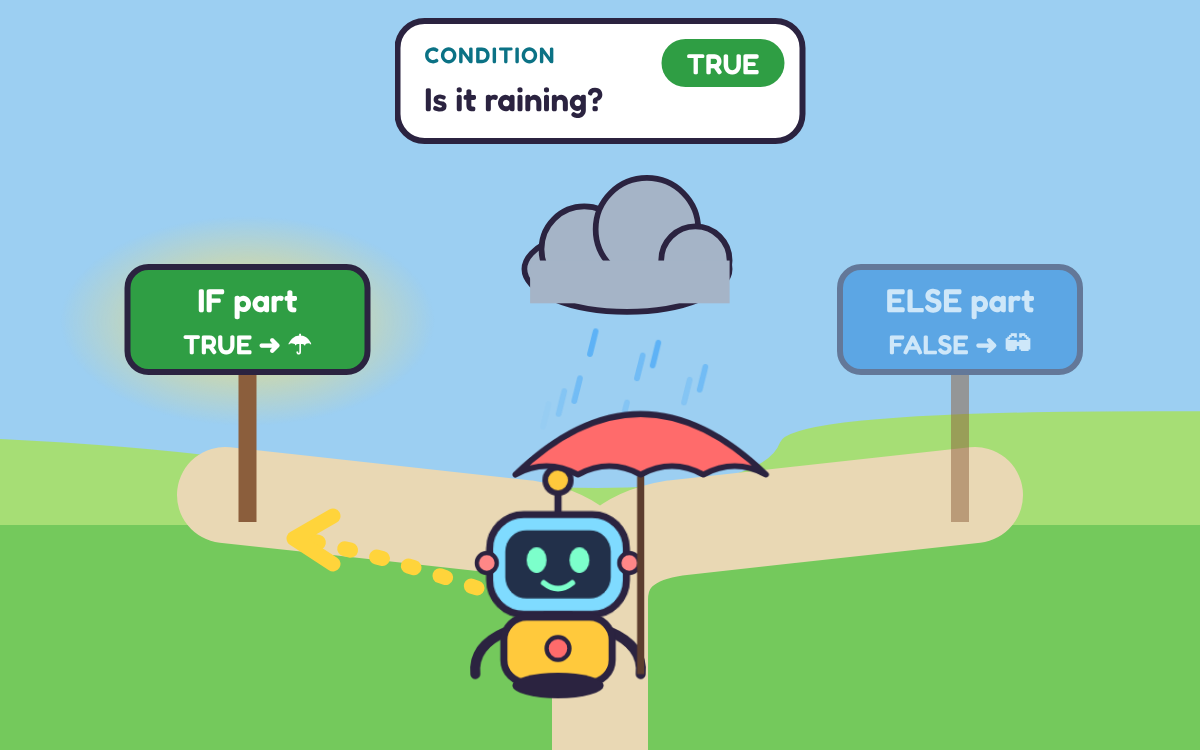
- What a condition is and why its answer is true or false
- How an if-else block runs one path, never both
- The difference between inputs, like sensors, and outputs, like lights
- How a score variable stores a value that changes
- How to predict and explain what an if-else program will do
- How to test, spot and fix bugs in a program
Chapter by chapter
- Conditions: questions with a true or false answer Free to try
Years 3–6 computing · 1
- Selection with if and else: choosing between two actions
Years 3–6 computing · 1
- Inputs, outputs and variables: programs that react
Years 3–6 computing · 1
- Explaining programs: predict what an if-else program will do
Years 3–6 computing · 2
- Debugging: find and fix errors in if-else programs
Years 3–6 computing · 2
- If-else Challenge (10 questions)
What the chapters cover in the national curriculum in England:
- Years 3–6 computing: Use sequence, selection, and repetition in programs; work with variables and various forms of input and output
- Years 3–6 computing: Use logical reasoning to explain how some simple algorithms work and to detect and correct errors in algorithms and programs
About this adventure
If and Else in Coding is an interactive game that teaches children aged 8–11 how programs use selection to choose what to do, matching KS2 computing. Players find out what a condition is, how an if-else block picks one of two paths, and how to explain and fix programs that use it.
Guided by Bit the robot, children make it rain to test a condition, drag blocks into the if and else parts, and watch each program run as the chosen path lights up. They control a night light with a light sensor, type answers into a quiz machine that keeps a score in a variable, and predict what programs will say before pressing Run.
Key terms are explained simply: a condition is a question with a true or false answer, an input goes into a computer and an output comes out, and debugging means finding and fixing mistakes.
Questions and answers
What does if and else mean in coding?
If and else let a program choose between two actions. The computer checks a condition: if it is true, the if part runs, and if it is false, the else part runs instead. Only one of the two parts runs each time.
What is selection in programming for KS2?
Selection is when a program decides which instructions to run by checking a condition. In KS2 computing, children use if and if-else blocks, often in Scratch, so that a program reacts differently to different inputs.
What is a condition in coding?
A condition is a question that a computer can answer with true or false, such as "Is the button pressed?" or "Is the score 10?". An instruction like "jump up" is not a condition, because it cannot be true or false.
What age is this if and else game for?
The game is designed for children aged 8 to 11, pitched mainly at Year 4. It suits younger children with some block-coding experience and older children who want to practise selection, predicting programs and debugging.
What is included in the game and how long does it take?
It has five chapters, an optional refresher on sequence and loops, and a ten-question final challenge. Playing everything takes about 50 minutes, and children can pick any chapter from the map and return to it later.
More to explore
See all
Algorithms for Kids: Program Bop the Robot in Robo Town
Learn what an algorithm is and why robots need precise instructions, then program Bop the robot and predict w…
Debugging Simple Programs: A Bug Hunt with Beep
Learn debugging simple programs: build routes for Beep the garden robot, then test them, find the step that g…
Sequences and Loops: Code a Robot and Squash the Bugs
Learn how sequences and loops make programs work by coding Beep the robot across a grid, predicting his moves…
Variables in Coding: Build Scores and Timers with Bit
Learn how variables in coding store scores, timers and names, then use set, change, loops and if blocks to bu…
Animal Life Cycles: Grow a Frog, Butterfly, Robin and Rabbit
Learn how animal life cycles work by helping a frog, butterfly, robin and rabbit grow, from egg or birth to a…
Skeletons and Muscles: Build a Body with Skelly
Learn how skeletons and muscles work together: build a skeleton, test how bones protect you, and make an arm…
The Heart and Circulatory System: Ride with Rosie
Learn how the heart and circulatory system work, then guide Rosie the red blood cell round the body, build yo…
 TapLearn